> For the complete documentation index, see [llms.txt](https://docs.webstudio.is/llms.txt). Markdown versions of documentation pages are available by appending `.md` to page URLs; this page is available as [Markdown](https://docs.webstudio.is/university/foundations/breakpoints.md).
# Breakpoints
Add, edit, and manage breakpoints to control how your site responds to different screen sizes and conditions.
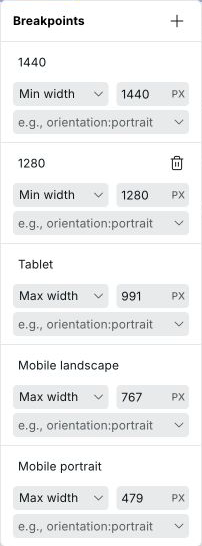
Breakpoints are found at the top of the builder canvas. They define the screen widths (and other media conditions) at which your site's styles change. Webstudio is **desktop-first by default** — Base has no media condition and applies everywhere, and the default breakpoints use max-width to adjust styles as the screen gets smaller. You can change this by adding min-width breakpoints instead, making your project mobile-first.
For guidance on how to use breakpoints to build responsive layouts, see [Responsive design](/university/foundations/responsive-design.md).
## Two types of width breakpoints
**Max-width breakpoints** apply styles when the screen is at or below the specified width. This is the **desktop-first** approach — you design for large screens first on Base, then add max-width breakpoints to adjust styles as the screen gets smaller.
**Min-width breakpoints** apply styles when the screen is at or above the specified width. This is the **mobile-first** approach — you design for small screens first, then add min-width breakpoints to adjust as the screen gets larger.
You can mix both types in one project if needed.
## Default breakpoints
The default breakpoints use the **max-width** (desktop-first) approach:
| Breakpoint | Condition | Description |
| -------------------- | ------------------ | --------------------------------------------------------------- |
| **Base** | None (default) | Applies to all screen sizes — the starting point for all styles |
| **Tablet** | `max-width: 991px` | Screens 991px wide and below |
| **Mobile landscape** | `max-width: 767px` | Screens 767px wide and below |
| **Mobile portrait** | `max-width: 479px` | Screens 479px wide and below |
## How styles cascade
Styles cascade **in the direction that narrows the match**:
* With **max-width** breakpoints: styles flow from Base (largest) downward to smaller breakpoints. A style set on Base applies everywhere; a style on the 479px breakpoint only applies at 479px and below.
* With **min-width** breakpoints: styles flow upward. A style set on a 768px min-width breakpoint applies to all screens 768px and wider.
Each breakpoint can override styles inherited from the previous one in the cascade.
## Adding a breakpoint
1. Click any breakpoint in the top bar to open the breakpoint menu.
2. Click **+** to add a new breakpoint.
3. Set a **min-width** or **max-width** value, or choose a **media condition** (see below).
4. Give it a label.
## Editing and deleting breakpoints
Click any breakpoint to open its settings. You can change the width, label, or media condition. Breakpoints can be deleted unless they are the base breakpoint.
## Custom media conditions
Beyond screen width, Webstudio supports any CSS media condition. This lets you style for user preferences and device capabilities:
| Category | Conditions |
| ------------------ | --------------------------------------------------- |
| **Color scheme** | `dark`, `light` |
| **Reduced motion** | `reduce`, `no-preference` |
| **Orientation** | `portrait`, `landscape` |
| **Contrast** | `more`, `less`, `no-preference` |
| **Pointer** | `coarse`, `fine`, `none` |
| **Display mode** | `fullscreen`, `standalone`, `minimal-ui`, `browser` |
### Example: dark mode
1. Add a breakpoint, select **Color Scheme: Dark**.
2. Label it "Dark".
3. Select it and style your dark theme — the canvas immediately previews dark mode.
4. The published site automatically switches based on the visitor's system preference.
### Example: reduced motion
1. Add a breakpoint with condition **Reduced Motion: Reduce**.
2. Disable or simplify animations for affected users.
3. Improves accessibility for users with vestibular disorders.
## Related
* [Responsive design](/university/foundations/responsive-design.md) – How to use breakpoints to build responsive layouts
* [Style panel](/university/foundations/style-panel.md) – Applying styles at each breakpoint
## Style label colors
When a breakpoint is active, style property labels in the Style Panel use color to show where a value comes from.
An orange label means the value is inherited from a larger breakpoint
See \[Label colors]\(anatomy-of-the-webstudio-builder.md#label-colors) for the full reference. Hover any label to see a tooltip with the exact source.
{% hint style="warning" %}
Mixing `min-width` and `max-width` breakpoints in the same project makes style cascading harder to reason about. Stick to one direction for maintainability.
{% endhint %}
## Related
* [Responsive design](/university/foundations/responsive-design.md) – How to build layouts that adapt to different screen sizes
* [Style panel](/university/foundations/style-panel.md) – Apply styles at the selected breakpoint
* [Label colors](/university/foundations/anatomy-of-the-webstudio-builder.md#label-colors) – Full reference for property label colors
* [Project settings](/university/foundations/project-settings.md) – Breakpoints can also be managed via Project settings
---
# Agent Instructions
This documentation is published with GitBook. GitBook is the documentation platform designed so that both humans and AI agents can read, navigate, and reason over technical content effectively. Learn more at gitbook.com.
## Querying This Documentation
If you need additional information that is not directly available in this page, you can query the documentation dynamically by asking a question.
Perform an HTTP GET request on the current page URL with the `ask` query parameter, and the optional `goal` query parameter:
```
GET https://docs.webstudio.is/university/foundations/breakpoints.md?ask=&goal=
```
`ask` is the immediate question: it should be specific, self-contained, and written in natural language.
`goal` is optional and describes the broader end goal you are ultimately trying to accomplish on behalf of the user. GitBook uses it to tailor the answer towards what is most useful for that goal.
The response will contain a direct answer to the question and relevant excerpts and sources from the documentation.
Use this mechanism when the answer is not explicitly present in the current page, you need clarification or additional context, or you want to retrieve related documentation sections.