> For the complete documentation index, see [llms.txt](https://docs.webstudio.is/llms.txt). Markdown versions of documentation pages are available by appending `.md` to page URLs; this page is available as [Markdown](https://docs.webstudio.is/university/foundations/page-settings.md).
# Page settings
Configure per-page settings such as path, SEO, authentication, redirects, and metadata.
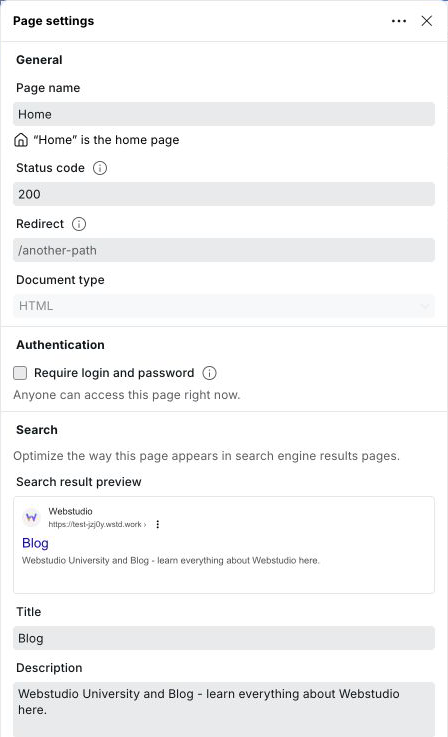
Page settings control how an individual page behaves — its URL, SEO metadata, authentication, status code, redirect, and more. Open Page Settings by clicking the gear icon next to any page in the Pages panel.
## Page name
The name displayed in the Pages panel in the builder. It does not affect the URL or any output — it's purely for organizing pages in the editor.
When creating a page from a [page template](/university/foundations/page-templates.md), the page name is pre-filled from the template and can be adjusted before the page is created.
## Draft pages
Mark an unfinished page as a draft to keep working on it without including it in the next deployment. Open the page settings menu and choose **Mark as draft**. The Pages panel prefixes its display name with `[Draft]` without changing the stored page name.
Draft pages remain editable, previewable, linkable, copyable, and duplicable in the Builder. They continue to reserve their paths, but Webstudio excludes them from generated routes, public page collections, sitemaps, staging, and production builds.
Choose **Stage for publish** from the same menu when the page is ready. This removes its draft state so it can be included in a future deployment; it does not publish the site immediately.
The home page and the `/*` catch-all page cannot be drafts. A draft must be staged before you can make it the home page.
Connected agents can create and edit draft pages and include them in private generated previews for visual audits. This does not expose the drafts on staging or production.
## Path
The URL path for this page, e.g. `/about` or `/blog/:slug`.
### Path syntax
Webstudio paths can be static or dynamic. Dynamic segments use a `:` prefix, making the page a [Dynamic Page](/university/foundations/cms.md#dynamic-pages).
| Pattern | Matches |
| -------------- | ----------------------------- |
| `/about` | One static route |
| `/blog/:slug` | One dynamic segment |
| `/blog/:slug?` | Optional dynamic segment |
| `/docs/*` | Everything under `/docs/` |
| `/docs/:path*` | Named wildcard under `/docs/` |
Path rules:
* Paths must start with `/`, except the home page path, which is empty
* Paths cannot contain repeating `/`
* Paths cannot end with `/`, except the home route `/`
* Wildcards such as `*` and `:path*` must be the final segment
* Parameter names can contain letters, numbers, and underscores
Webstudio Cloud sites and exported JavaScript applications permanently redirect a trailing-slash URL such as `/about/` to the page path `/about` and preserve its query string. For static exports, the hosting platform controls [trailing-slash behavior](/university/self-hosting.md#static-site-url-behavior).
## Status code
The HTTP status code returned when this page is requested. Defaults to `200`.
Can be bound to an expression to return a different code conditionally — most commonly `404` when a dynamic page receives a parameter that doesn't match any CMS record. See [Handling dynamic 404s](/university/foundations/cms.md#handling-dynamic-404s) for details.
## Redirect
Redirects all requests for this page's path to another path. Useful for retired URLs or reorganized site structure.
Enter a path such as `/new-page`. This performs a `301` permanent redirect. Leave empty if no redirect is needed.
The redirect field supports expressions, making it dynamic. For example, on a dynamic page you can redirect to your 404 page when no CMS data is found. See [Alternative: redirect instead of showing 404 content](/university/foundations/cms.md#alternative-redirect-instead-of-showing-404-content) for details.
## Language
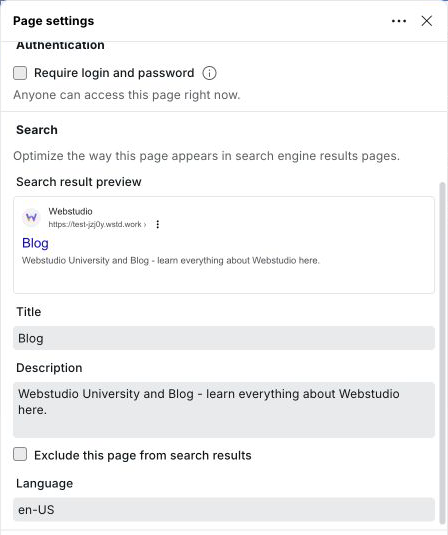
Sets the `lang` attribute on the `` element for this page, e.g. `en`, `fr`, `de`. Used by browsers, screen readers, and search engines to identify the page language.
Can be bound to an expression — for example using a URL parameter — to serve pages in different languages from a single Dynamic Page.
## Document type
Controls the response format for the page.
| Type | Use for |
| -------- | ---------------------------------------------------------------------------------------------------------------------------------- |
| **HTML** | Regular web pages built visually on the canvas |
| **XML** | XML-based output such as sitemaps and RSS feeds. See the [XML Node component](/university/core-components/xml-node.md) for details |
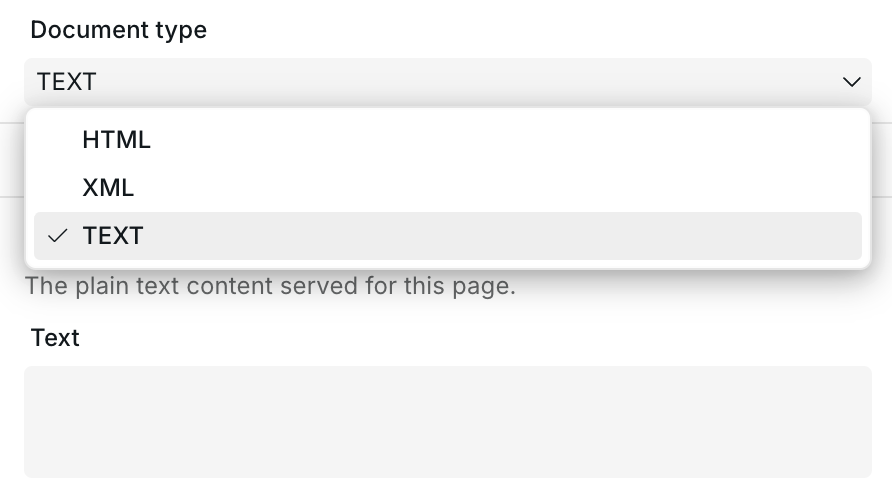
| **TEXT** | Plain text output such as `robots.txt`, `ads.txt`, `security.txt`, verification files, or generated text responses |
HTML is the default document type. XML and TEXT pages cannot be set as the home page.
## Plain text pages
Use the **TEXT** document type when a route needs to serve plain text instead of an HTML document. Text pages return only the content from the page's **Content** section with a `text/plain` response.
Common uses include:
* `robots.txt`
* `ads.txt`
* `/.well-known/security.txt`
* Domain or service verification files
* Dynamic text generated from Resources and expressions
To create a plain text page:
1. Create or open a page in the Pages panel
2. Set the **Path**, such as `/robots.txt` or `/.well-known/security.txt`, using the same [path syntax](#path-syntax) as other pages
3. Set **Document type** to **TEXT**
4. Open the **Content** section
5. Enter the plain text, or bind the field to an expression
6. Publish the site
Plain text page settings
Plain text pages can still use Page Settings fields such as Status code, Redirect, Authentication, and Dynamic data. SEO, social image, and custom metadata fields apply only to HTML pages, so they are hidden when the document type is TEXT.
Plain text pages are not included in the generated sitemap because they are not HTML pages.
## Authentication
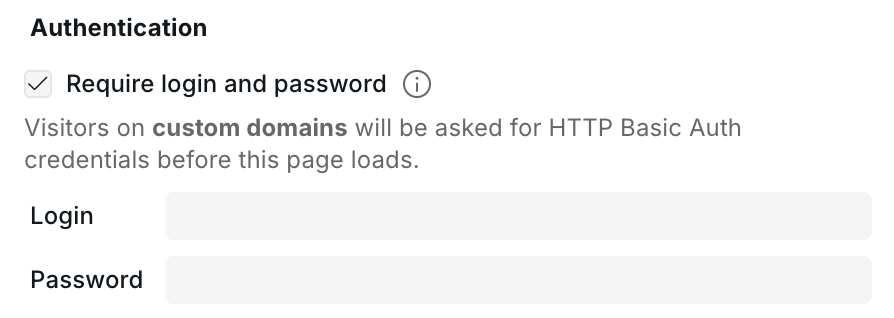
Use Authentication to require HTTP Basic Auth credentials before visitors can load this page on custom domains.
1. Open the page's settings from the Pages panel
2. Open the **Authentication** section
3. Enable **Require login and password**
4. Enter a login and password
5. Publish the site
Page authentication is useful for private previews, client-only pages, internal pages, or temporary gated content.
Page authentication
{% hint style="info" %}
Authentication applies to protected pages on custom domains. Staging domains have their own built-in password protection, described in [Publishing & custom domains](/university/foundations/publishing-and-custom-domains.md#staging-password-protection).
{% endhint %}
{% hint style="warning" %}
Authentication is a Pro feature for custom domains. You can publish to staging for free, but publishing authentication to custom domains requires a plan that includes it.
{% endhint %}
Login and password rules:
* Login is required
* Password is required
* Login cannot contain `:`
* Login and password cannot contain whitespace
* Password can contain `:`
To protect multiple routes, dynamic paths, or wildcard sections of the site, use [Project settings](/university/foundations/project-settings.md#authentication).
## Search
SEO settings that control how the page appears in search engine results.
### Title
The `` tag and the headline shown in search results. Should clearly describe the page content. Can be bound to a CMS variable on dynamic pages.
### Description
The meta description shown as the snippet in search results. Does not affect rankings directly but influences click-through rate. Can be bound to a CMS variable.
### Exclude from search
Adds a `noindex` directive to the page, preventing search engines from indexing it.
## Social image
The Open Graph image displayed when the page is shared on social media (Facebook, X, LinkedIn, etc.). You can either upload an image or bind a URL expression to a dynamic image from your CMS.
<picture><source srcset="/files/fAqZp29ih3eTTtwjHuj7" media="(prefers-color-scheme: dark)"><img src="https://330243581-files.gitbook.io/~/files/v0/b/gitbook-x-prod.appspot.com/o/spaces%2FTep4EGj6hSC54ozHujyK%2Fuploads%2Fgit-blob-185e2f1ed673df9165c2f774415abcb8a3294cf6%2Fpage-settings-social-light.png?alt=media" alt="Page settings Social image section with a selected blue and purple glass wave image and its social sharing preview"></picture>
## Custom metadata
Add arbitrary `<meta>` tags to the page's `<head>`. Each entry has a **property** (the meta tag's `name` or `property` attribute) and a **content** value, both of which support expressions.
<picture><source srcset="/files/UUhWsuGhcJhkvAdNLkV1" media="(prefers-color-scheme: dark)"><img src="https://330243581-files.gitbook.io/~/files/v0/b/gitbook-x-prod.appspot.com/o/spaces%2FTep4EGj6hSC54ozHujyK%2Fuploads%2Fgit-blob-bb9ea997ac7eae8643d1ea31cb4e67741eb7a36e%2Fpage-settings-custom-metadata-light.png?alt=media" alt="Page settings with a blue and purple wave image in the Social sharing preview above empty Custom metadata fields"></picture>
Use this for meta tags not covered by the fields above, such as `og:type`, `twitter:card`, or any custom meta needed by third-party integrations.
## Dynamic data
Variables and Resources defined on the page are scoped to that page and are available to bind to components and Page Settings fields. Define a [Resource variable](/university/foundations/variables.md#resource) here to fetch CMS data and then bind it to the Title, Description, Status Code, and other fields above.
## Content mode access
In Content mode, editors can update the page settings that affect editable content and share previews:
* Page name
* Static page path
* Search title and description
* Exclude from search
* Language
* Social image
* Custom metadata
Content editors cannot create dynamic paths such as `/blog/:slug`, wildcard paths such as `/docs/*`, or external URL paths. Redirects, status codes, document type, authentication, dynamic data, and other structural settings remain available only in Design mode.
## Related
* [CMS](/university/foundations/cms.md) – Connect to a CMS and use dynamic data on pages
* [Dynamic 404 handling](/university/foundations/cms.md#handling-dynamic-404s) – Return 404 when CMS data is missing
* [Project settings](/university/foundations/project-settings.md) – Site-wide settings such as favicon, custom code, redirects, and route authentication
* [Page templates](/university/foundations/page-templates.md) – Create reusable blueprints for new pages
* [Publishing & custom domains](/university/foundations/publishing-and-custom-domains.md) – Publish protected pages to custom domains
* [Data variables](/university/foundations/variables.md) – Define and use variables on pages
* [Expression editor](/university/foundations/expression-editor.md) – Bind expressions to Page Settings fields
* [XML Node](/university/core-components/xml-node.md) – Build XML pages such as sitemaps
* [Custom 404 page](/university/how-tos/how-to-make-a-custom-404-page.md) – Create a custom 404 page
---
# Agent Instructions
This documentation is published with GitBook. GitBook is the documentation platform designed so that both humans and AI agents can read, navigate, and reason over technical content effectively. Learn more at gitbook.com.
## Querying This Documentation
If you need additional information that is not directly available in this page, you can query the documentation dynamically by asking a question.
Perform an HTTP GET request on the current page URL with the `ask` query parameter, and the optional `goal` query parameter:
```
GET https://docs.webstudio.is/university/foundations/page-settings.md?ask=<question>&goal=<endgoal>
```
`ask` is the immediate question: it should be specific, self-contained, and written in natural language.
`goal` is optional and describes the broader end goal you are ultimately trying to accomplish on behalf of the user. GitBook uses it to tailor the answer towards what is most useful for that goal.
The response will contain a direct answer to the question and relevant excerpts and sources from the documentation.
Use this mechanism when the answer is not explicitly present in the current page, you need clarification or additional context, or you want to retrieve related documentation sections.